PDF imposition examples. Every page accounted for.
Download six PDF imposition examples with source files, exact settings, and actual exports: 2-up, 4-up, booklets, repeated pages, and a partial cut-and-stack job.
Raffle Ticket Maker’s six downloadable examples show sequential N-up, booklet pairs, repeated artwork, intentional blanks, and cut-and-stack gathering. Each includes an illustrated source PDF with printed page numbers, settings, and an actual engine export. Inspect the complete PDFs to see what happens on a partial final sheet, where the back cover goes, and which piles become the finished sequence.
- Source PDF + actual exported PDF
- Exact settings and measured page counts
- Partial final grids included
Open the files. Follow the numbers.
Each source looks like a real job: a fun-run runner pack, phone-photography workshop slides, a summer camp guide, two neighbourhood coupons, park-workout cards, and a bike shop catalogue. Every page also prints its number large, so layout errors are easy to spot. They are digital examples, not photographs of a finished print run. Use the source and output side by side to inspect page membership, orientation, empty positions, and sheet size.
Each example includes the original PDF, the exported PDF, a settings file, and a result manifest. The manifest records the engine build, source and output dimensions, page membership, and file checksums. A page-membership list records which source pages appear on a side; it is not a diagram of their left-to-right positions or your printer’s feed direction.
| Example | Source pages | Output PDF pages | Physical sheets |
|---|---|---|---|
| Sequential 2-up | 5 | 3 sides | 3 single-sided; 2 duplex |
| Sequential 4-up | 9 | 3 sides | 3 single-sided; 2 duplex |
| Eight-page booklet | 8 | 4 sides | 2 duplex, nested and folded |
| Four copies of each design | 2 | 2 sides | 2 single-sided |
| Cut and stack | 10 | 3 sides | 3 single-sided, then cut and gather |
| Booklet with planned blanks | 10 + 2 blanks | 6 sides | 3 duplex, nested and folded |
2-up: five pages, including the last one.
The source is a five-page fun-run runner pack, printed as a compact 2-up copy. A sequential two-column, one-row layout puts pages 1 and 2 on the first side, 3 and 4 on the second, and page 5 on the third. The unused position stays empty. A 2-up setting does not mean two copies of every page. The source pages are A5 (148 × 210 mm), fitted to A4 landscape with 5 mm margins and no gutter.
This example disables double-sided layout in the imposition step. You can print its three output pages single-sided or duplex later. Printing duplex uses two physical sheets with the final reverse side unused; it does not change which source pages share an output side.
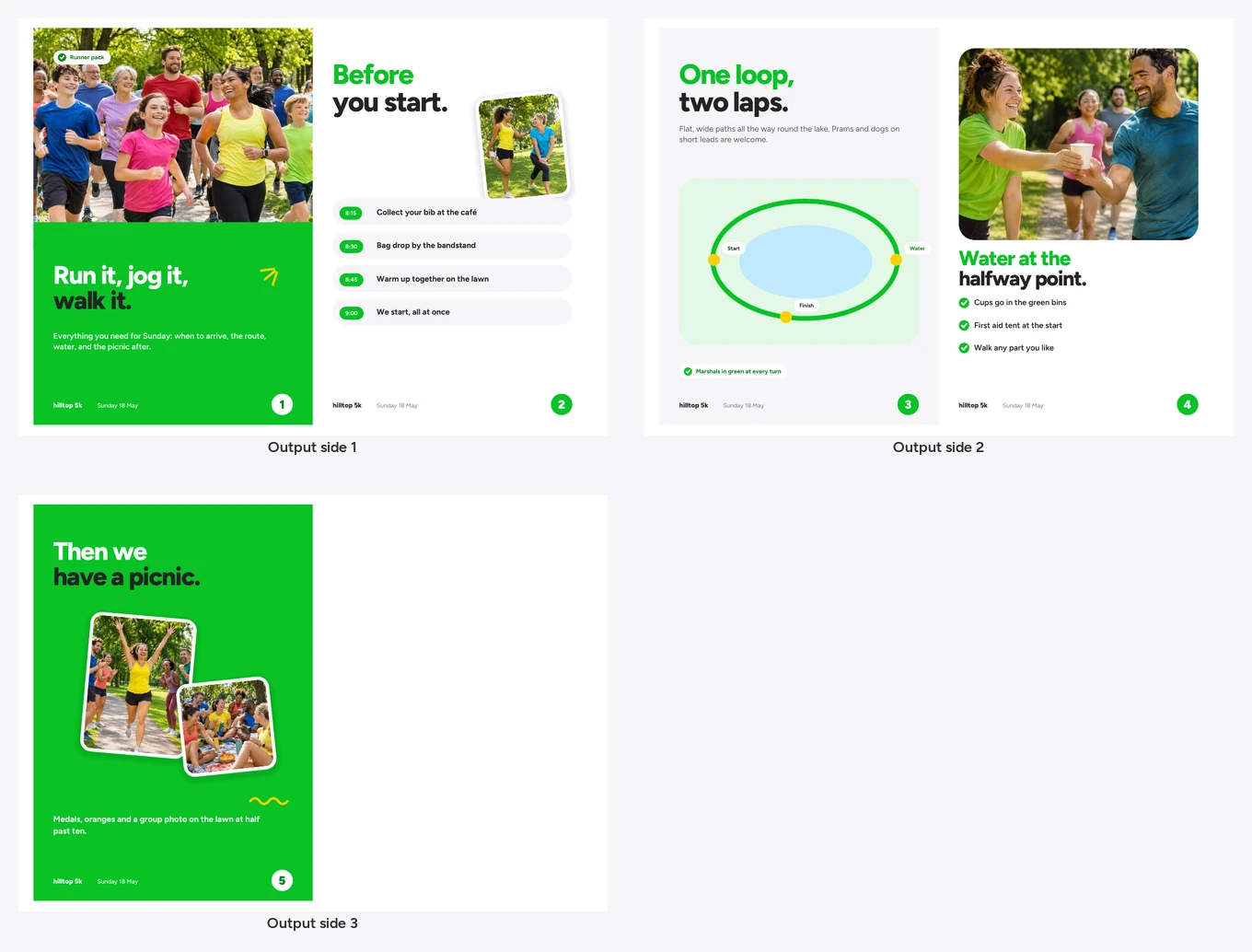
| Output side | Source pages | Unused positions |
|---|---|---|
| 1 | 1, 2 | 0 |
| 2 | 3, 4 | 0 |
| 3 | 5 | 1 |
4-up: nine slides, three output sides.
A nine-slide phone-photography workshop at four slides per side needs three output pages, not two. The first side contains pages 1–4, the second contains 5–8, and the third contains page 9. Three positions on the last side remain unused. The A5 source pages are fitted to a 2 × 2 grid on A4 landscape with 5 mm margins and no gutters. Check the final side when evaluating any N-up tool: a preview of the first full grid cannot show whether the last page survived.
Use the exported PDF when handing off the layout. In the print dialog, choose one output PDF page per side. Applying four pages per sheet again can shrink sixteen original pages onto a side. Small text may be unreadable even when every page is technically present.
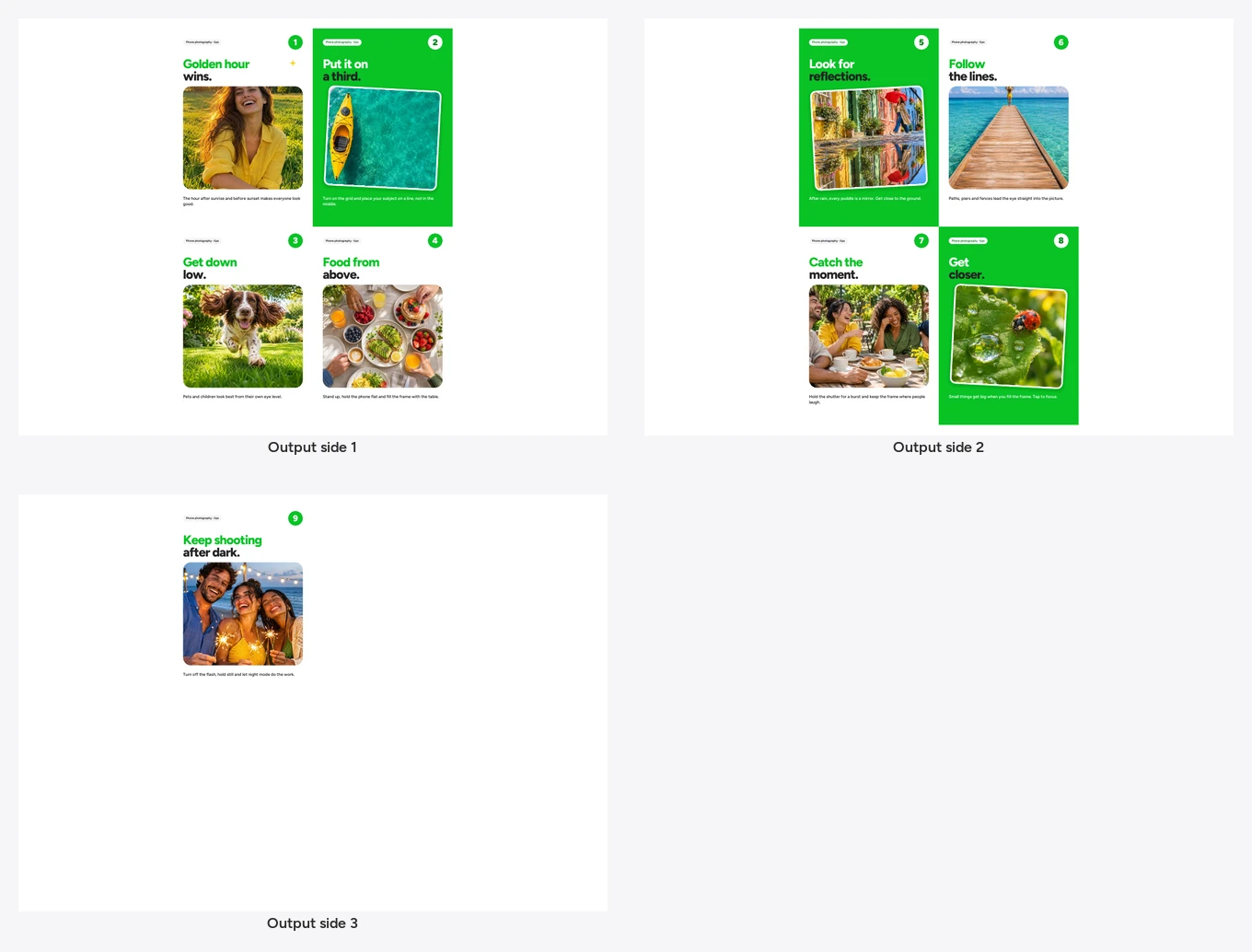
| Output side | Source pages | Unused positions |
|---|---|---|
| 1 | 1, 2, 3, 4 | 0 |
| 2 | 5, 6, 7, 8 | 0 |
| 3 | 9 | 3 |
Eight pages that become a booklet.
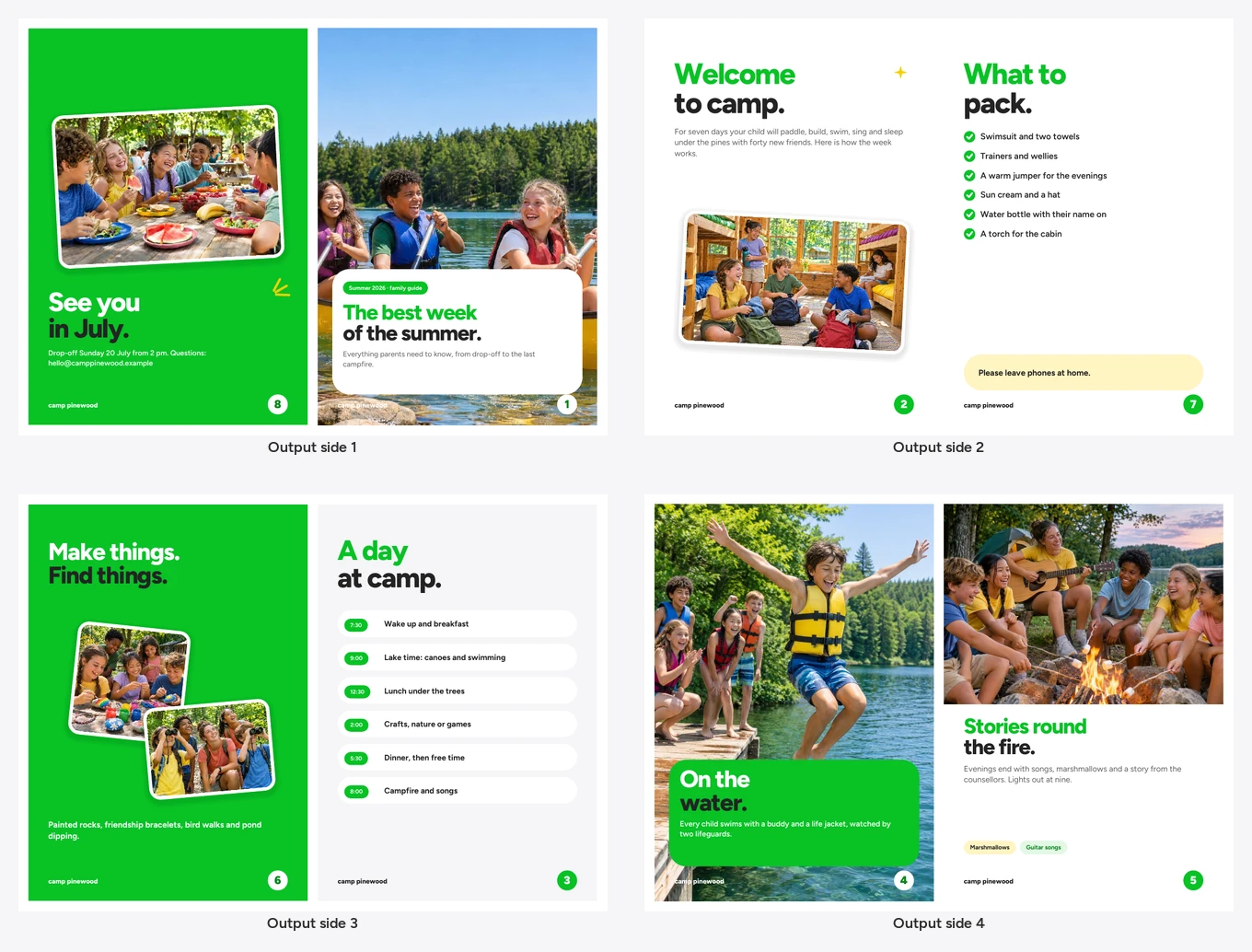
The source is an eight-page summer camp guide for families. For an eight-page saddle-stitched booklet, pair pages 8 with 1, 2 with 7, 6 with 3, and 4 with 5. These four printed sides occupy two sheets. Nest the sheets, fold them, and the pages should read from 1 through 8. The outside cover pair is 8 and 1; the centre spread is 4 and 5.
The download fits A5 source pages onto A4 landscape with 5 mm margins and a 5 mm spine gap. Those allowances reduce the artwork; this is not an unscaled A5 print specification. Inspect the exported pages for the actual left/right placement and orientation. A list of booklet pairs is not a universal manual-duplex printing sequence: feed direction, back-side turning, and printer-driver settings still need to match your machine. The university and GNOME references below explain their own printing contexts.
Eight pages in a booklet is different from 8-up, which means eight positions on one side. It is also different from a one-sheet mini-zine that uses a slit and several folds. Use this two-sheet example for a conventional nested booklet, not those other constructions.
Two designs: repeat each one, or use each once?
The two-page source holds two different neighbourhood coupons, one from a climbing gym and one from an ice-cream shop. Step & repeat with a 2 × 2 grid creates two output sides: four copies of coupon 1, then four copies of coupon 2. Sequential four-up with the same source creates one side containing one copy of each coupon and two unused positions. The downloads below include both actual results.
Both layouts use A4 landscape, Fit scaling, and 5 mm margins. Repetition is deliberate; it is not a side effect of selecting four pages per sheet. These settings do not automatically make the two designs a registered front-and-back pair. Check the duplex workflow separately if that is the job.
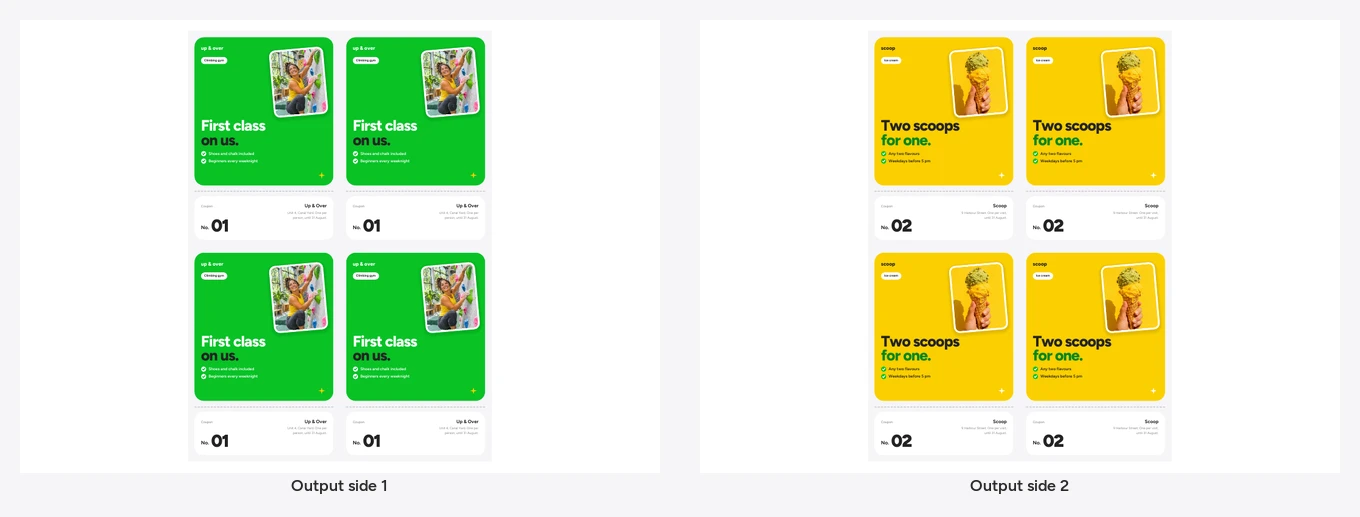
| Operation | Output sides | Source pages present |
|---|---|---|
| Sequential 4-up | 1 | Side 1: 1, 2; two positions unused |
| Step & repeat 4-up | 2 | Side 1: 1, 1, 1, 1. Side 2: 2, 2, 2, 2. |
Ten numbered workout cards, including a partial pile.
This 2 × 2 cut-and-stack example puts ten numbered park-workout cards on three A4 landscape sides, using one lift and per-cell gathering. The Fit setting rotates the page artwork: the card tops point left in the exported landscape view. The table below describes that actual view, not the order returned by the engine’s page-membership list.
Keep output sides 1, 2, and 3 in that top-to-bottom order, face up and identically oriented. Cut the four matching cell positions through the stack. Gather bottom-left first, then top-left, bottom-right, and top-right, without reversing any pile. Remove the two empty positions from the last pile. The modeled result is 1–3, 4–6, 7–9, then 10.
Alternatively, rotate every whole sheet 90° clockwise so the card tops point up before cutting; the equivalent gathering order is then top-left, top-right, bottom-left, bottom-right. Printer delivery order and turning a pile over can change the result. This is a checked digital arrangement and gathering model, not a physical cutting test.
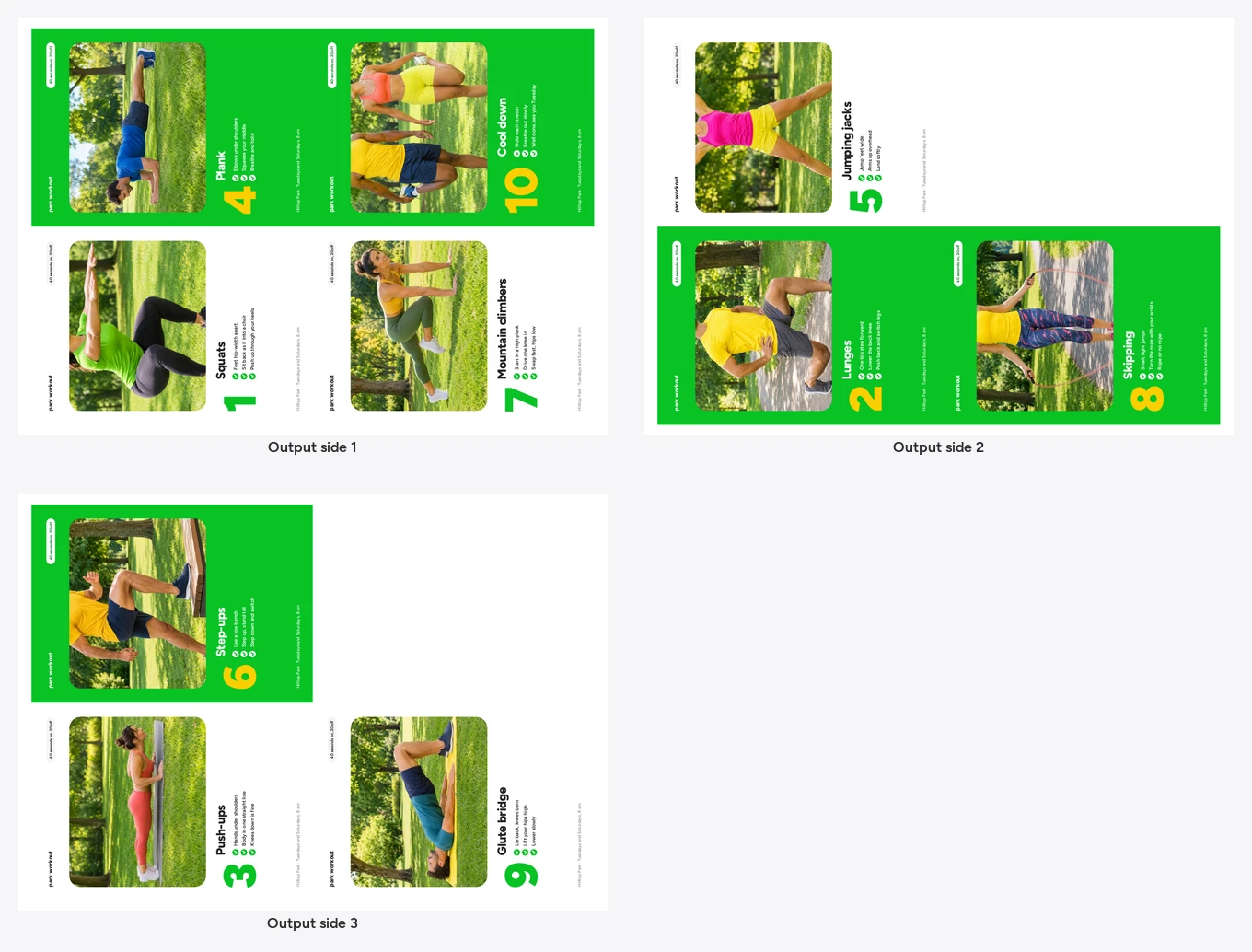
| Output side | Top-left | Top-right | Bottom-left | Bottom-right |
|---|---|---|---|---|
| 1 | 4 | 10 | 1 | 7 |
| 2 | 5 | Empty | 2 | 8 |
| 3 | 6 | Empty | 3 | 9 |
Ten pages into twelve positions. Keep the back cover outside.
A ten-page source needs two more positions for a conventional saddle-stitched booklet. In this bike shop catalogue, original page 10 is the back cover. We insert two blank pages before it, producing the prepared sequence 1–9, blank, blank, 10. The original back cover is now at prepared position 12, so it pairs with original page 1 on the outside.
Download original.pdf to see the ten-page input, source.pdf to inspect the prepared twelve-position reading document, and output.pdf for all six imposed sides. The blank source pages are genuinely empty. The manifest maps prepared positions back to original artwork; null entries represent the inserted blanks, not missing content.
The example uses A4 landscape, Fit scaling, 5 mm margins, and a 5 mm spine gap. It produces three duplex sheets. Keeping the back cover last is one editorial choice; if your design needs blanks elsewhere, place them deliberately and check the entire folded proof.
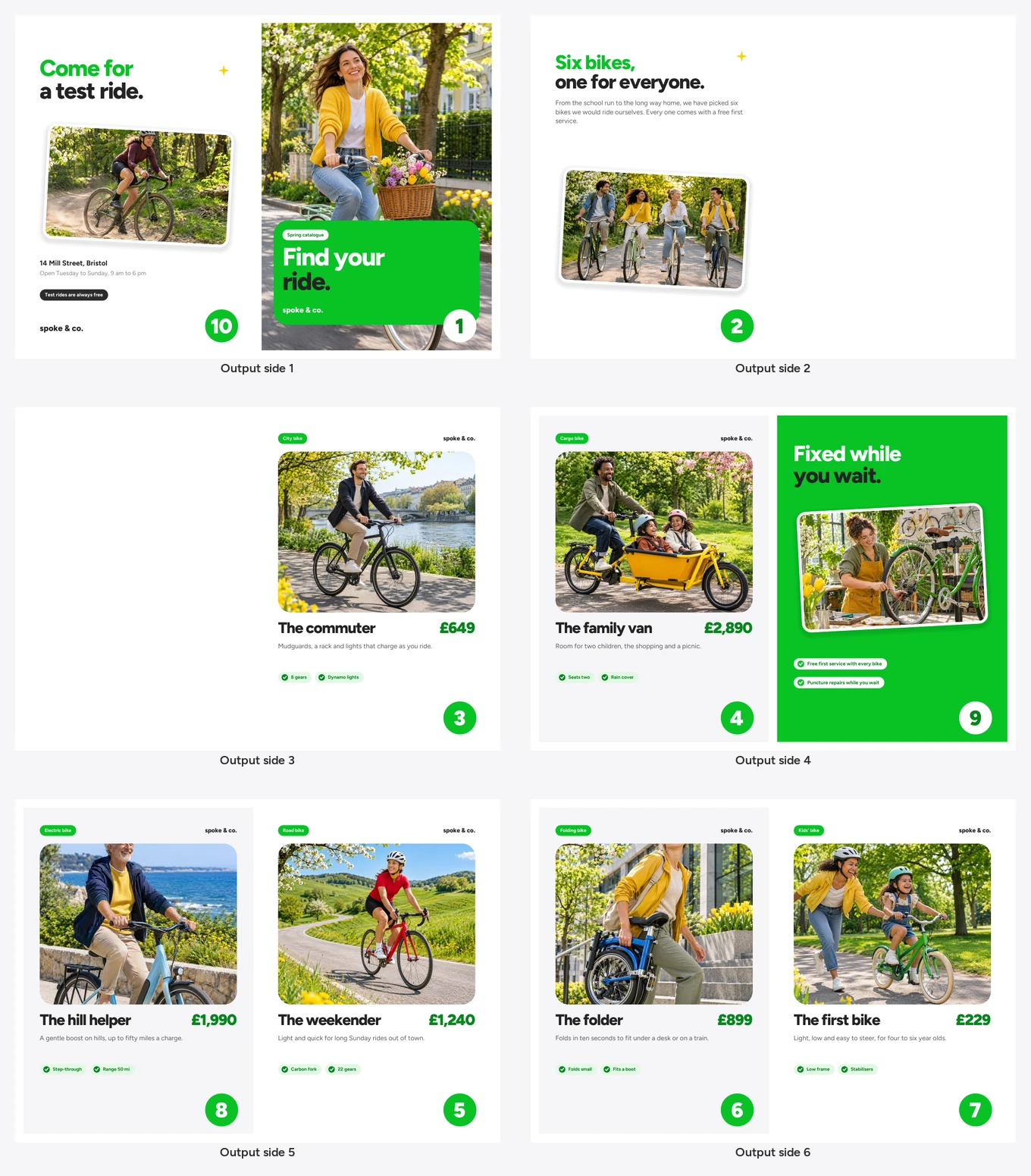
| Output side | Original artwork |
|---|---|
| 1 | 10 and 1 — back and front covers |
| 2 | Blank and 2 |
| 3 | Blank and 3 |
| 4 | 9 and 4 |
| 5 | 8 and 5 |
| 6 | 7 and 6 — centre pair |
Use the same source when comparing tools.
These files demonstrate Raffle Ticket Maker’s output for these specific settings. They are not a benchmark of another product, a preflight certification, or proof that every input PDF will behave the same way. A real job can include mixed page sizes, transparency, spot colours, bleed, or colour requirements that these example pages do not test.
- 01
Keep a copy of the source
Download the source PDF for the layout you need. Open it in Raffle Ticket Maker and confirm its original page count before adding an imposition step.
- 02
Match the job settings
Use the accompanying settings file to match the paper, orientation, rows and columns, scaling, margins, gaps, and page-order options. The JSON describes the setup; it is not an editor preset import.
- 03
Export and inspect every side
Compare source-page membership, sheet dimensions, placement, and the last partial grid with the published output. PDF bytes can differ across builds; compare the visible and measured result, not just the filename.
- 04
Print one complete copy
Print one PDF page per side on the matching paper. Check the duplex turn with your printer, then fold or cut the proof. Read every number in the intended finished order before producing the full quantity.
Before you
get started.
Can I use these PDF examples without signing in?
Yes. The source PDFs, exported PDFs, settings, and measured results are directly downloadable. The Raffle Ticket Maker editor itself needs a free Google sign-in.
Why is the last N-up side mostly empty?
A sequential grid uses each source page once. Five pages do not fill three 2-up sides; nine pages do not fill three 4-up sides. Empty positions preserve the correct page count. Use step and repeat when you want copies of the same artwork.
Does an eight-page booklet need eight sheets?
No. A conventional eight-page saddle-stitched booklet uses two physical sheets printed on both sides, with two booklet pages per printed side. It has four output PDF pages in the imposed file.
Are these examples a physical print test?
No. They are generated PDF outputs with measured dimensions and page maps. Make a physical proof on your own printer to check duplex orientation, registration, scaling, paper, and finishing.
Check the details.
Official product information and practical references. Reviewed .
The next step
is your PDF.
Start with a real sample. Adjust every step. Make a proof before the print run.