Make numbered event tickets.
Make numbered event tickets, admit-one tickets and drink tokens. Add a QR code or barcode to each, and print them on any paper or on perforated stock.
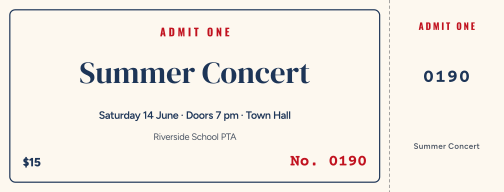
Choose the Admit one or Drink voucher design in Raffle Ticket Maker, type the event, date and price, and set how many tickets you need. Each ticket gets its own number, and optionally its own QR code or barcode, on a tear-off counterfoil. Download the PDF and print.
- Admit-one and voucher designs
- A QR code per ticket
- Counterfoil with matching number
An entry ticket with a counterfoil.
The Admit one design has the event in the middle and a counterfoil on the right that repeats the number, to tear off at the door. The Drink voucher design is a small token with no stub, for the bar or the buffet.
Something to check at the door.
A number on its own lets you cross tickets off a list. A QR code or barcode holding the number can be read with any scanner app. The ticket log lists every number with blank columns, so it doubles as a door list.
Different prices, different batches.
Give each batch a prefix: A- for adults, C- for children, V- for VIP. Recolour the design for each one so they are told apart at a glance, and continue the numbering from where the last batch ended.
Before you
get started.
Can I number seats?
Yes, from a list. Paste the seat codes, one per line, under Numbers, My list, and each ticket prints its own.
Does the QR code check tickets in?
No. Raffle Ticket Maker prints the code; it does not run a check-in system. The code holds whatever you give it, such as the ticket number or a link to your own page.
The next step
is your PDF.
Start with a real sample. Adjust every step. Make a proof before the print run.